> ## Documentation Index
> Fetch the complete documentation index at: https://docs.sentivel.com/llms.txt
> Use this file to discover all available pages before exploring further.
# Status pages
> Publish a status page on your own subdomain or domain.
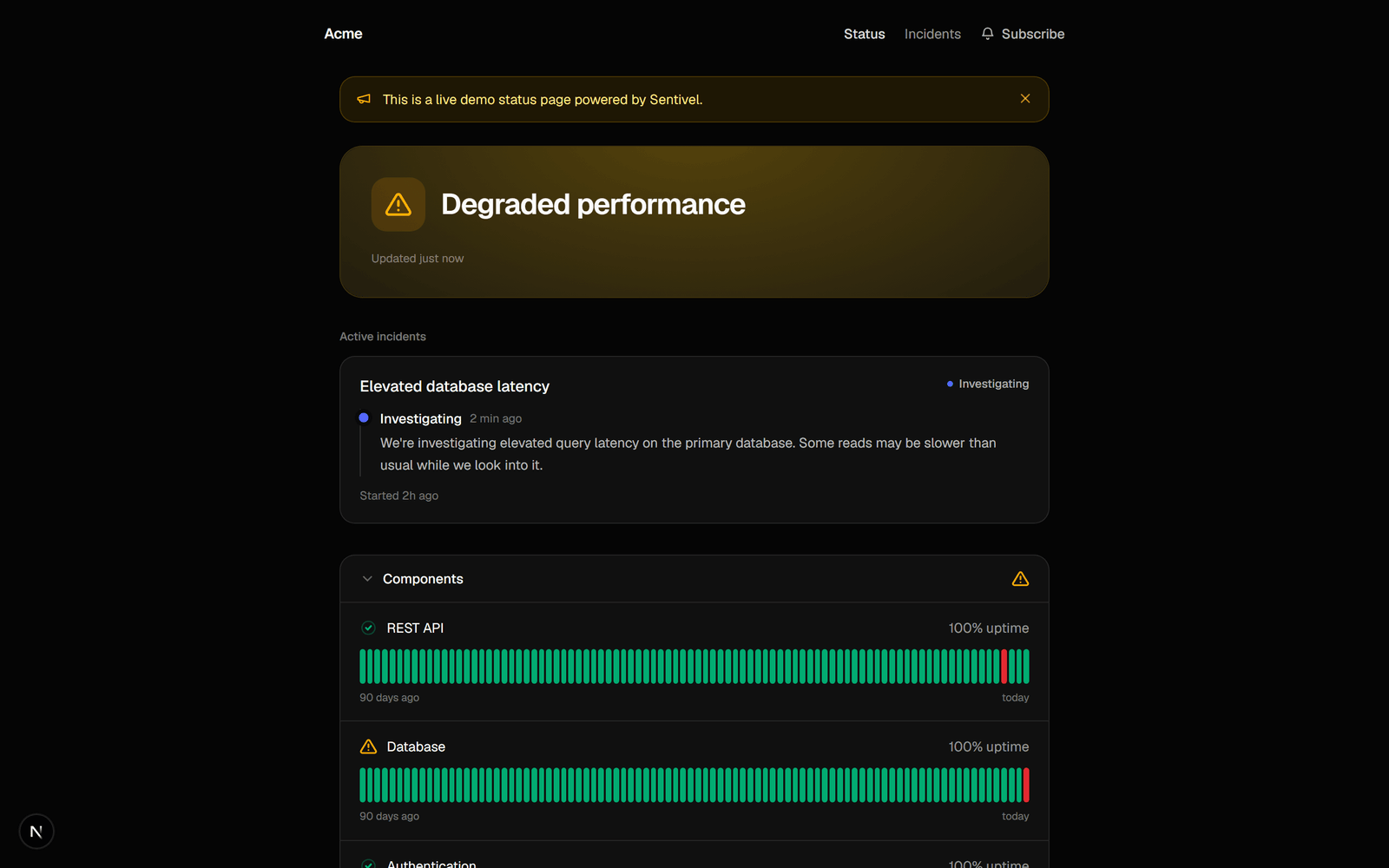 A status page shows your components, their current status, and a 90-day uptime
history, grouped by service. It updates from your monitors and your incidents. You
can run more than one.
## Create a page
1. Go to **Status page → New**.
2. Name it and pick a vanity URL.
3. Choose public or private.
The page is live at `your-slug.sentivel.com`. A page with zero dependencies is a
finished, valid state: add monitors, publish, done.
## Custom domains
Serve a page on your own domain (`status.yourcompany.com`):
1. Add the domain on the status-page settings.
2. Create the `CNAME` record it shows you.
3. Verify. Sentivel checks the DNS and provisions TLS.
## Design
Pick a design when you create the page:
* **Modern.** Bold, the default.
* **Classic.** Calm and conventional, with status words per component and a
classic uptime-bar footer.
Both render light and dark. Components group under their service, and a service's
description shows as the category subtitle.
## Announcements and incidents
Post an announcement for planned work or a heads-up. When an incident is open, the
page shows it in plain language and stops claiming "all systems operational".
Upstream advisories from [cascade](/guides/dependencies) appear here too.
## Subscribers and feeds
Customers can subscribe by email (double opt-in: they confirm before they ever
get a message) or follow the Atom feed at `/feed`. Both are notified when you post
an incident update.
## Embed status elsewhere
* **Badge.** An SVG at `…/badge.svg?component=` for a README or site footer.
* **Widget.** A themed live HTML widget you can iframe.
## Password-gate a page
Make a page private and set a password to share it with a limited audience without
making it public.
A status page shows your components, their current status, and a 90-day uptime
history, grouped by service. It updates from your monitors and your incidents. You
can run more than one.
## Create a page
1. Go to **Status page → New**.
2. Name it and pick a vanity URL.
3. Choose public or private.
The page is live at `your-slug.sentivel.com`. A page with zero dependencies is a
finished, valid state: add monitors, publish, done.
## Custom domains
Serve a page on your own domain (`status.yourcompany.com`):
1. Add the domain on the status-page settings.
2. Create the `CNAME` record it shows you.
3. Verify. Sentivel checks the DNS and provisions TLS.
## Design
Pick a design when you create the page:
* **Modern.** Bold, the default.
* **Classic.** Calm and conventional, with status words per component and a
classic uptime-bar footer.
Both render light and dark. Components group under their service, and a service's
description shows as the category subtitle.
## Announcements and incidents
Post an announcement for planned work or a heads-up. When an incident is open, the
page shows it in plain language and stops claiming "all systems operational".
Upstream advisories from [cascade](/guides/dependencies) appear here too.
## Subscribers and feeds
Customers can subscribe by email (double opt-in: they confirm before they ever
get a message) or follow the Atom feed at `/feed`. Both are notified when you post
an incident update.
## Embed status elsewhere
* **Badge.** An SVG at `…/badge.svg?component=` for a README or site footer.
* **Widget.** A themed live HTML widget you can iframe.
## Password-gate a page
Make a page private and set a password to share it with a limited audience without
making it public.