> ## Documentation Index
> Fetch the complete documentation index at: https://docs.sentivel.com/llms.txt
> Use this file to discover all available pages before exploring further.
# Integrations
> Send alerts to your tools, and bring alerts in from others.
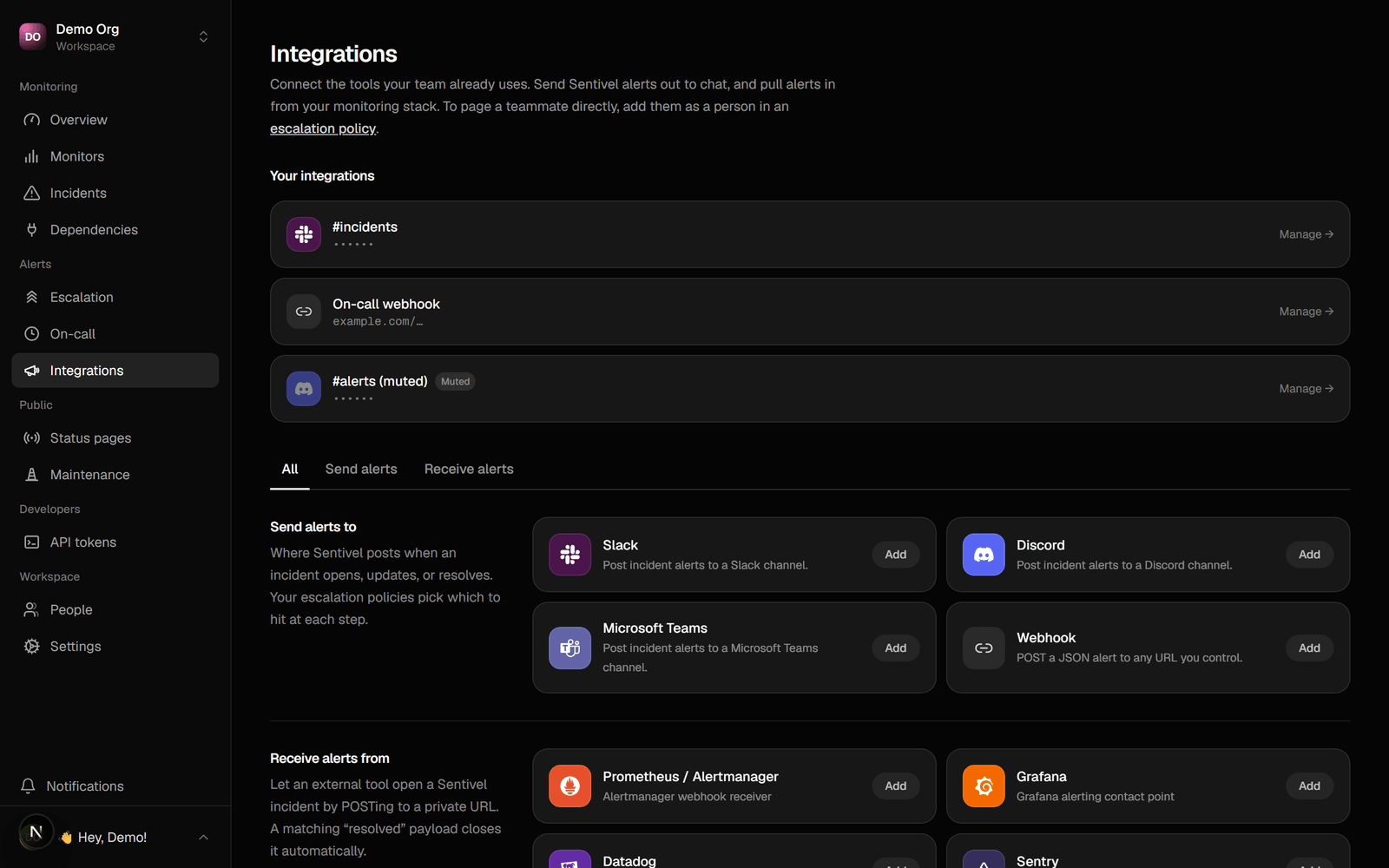 Integrations are the destinations Sentivel sends alerts to, and the sources it can
receive alerts from. Set them up under **Integrations**, then use them as targets
in an [escalation policy](/guides/escalation).
## Outbound destinations
* **Slack.** Post incidents to a channel.
* **Discord.** Post incidents to a channel.
* **Microsoft Teams.** Post to a Teams workflow (incoming webhook).
* **Webhook.** POST a JSON payload to any URL you control.
Add one with a guided, type-first setup. Name it, send a test, and mute it without
deleting when you need quiet. Webhook URLs are checked the same way monitor targets
are, so an integration can't be pointed at an internal address.
## Webhook payloads
A **Webhook** destination receives a `POST` with `Content-Type: application/json`.
The same reference appears in the dashboard when you add or edit one. Slack, Discord,
and Teams destinations receive a provider-shaped body instead, so build against the
Webhook type.
Sentivel sends three events. Branch on the `event` field.
```json incident.opened theme={null}
{
"event": "incident.opened",
"component": "API",
"title": "Service disruption — API",
"status": "opened",
"ackUrl": "https://www.sentivel.com/incidents/inc_9f3a/ack?token=..."
}
```
```json incident.resolved theme={null}
{
"event": "incident.resolved",
"component": "API",
"title": "Service disruption — API",
"status": "resolved"
}
```
`incident.escalated` fires on each escalation step while the incident is
unacknowledged. It carries the open fields plus `step` and `cycle`.
```json incident.escalated theme={null}
{
"event": "incident.escalated",
"step": 2,
"cycle": 0,
"component": "API",
"title": "Service disruption — API",
"status": "opened",
"ackUrl": "https://www.sentivel.com/incidents/inc_9f3a/ack?token=..."
}
```
`ackUrl` is present only while an incident is open and the Acknowledge button is
enabled for that destination. There is no signature header yet, so keep the secret
in the URL path and treat the endpoint as unlisted.
To drive a banner on your own site, switch it on for `incident.opened` and clear it
on `incident.resolved`, keyed off `component`.
## Inbound sources
Turn an external alert into a Sentivel incident:
* **Incoming webhook.** A per-integration signed URL. POST to it and Sentivel
opens an incident, mapping the payload to a title and metadata.
* **Email to incident.** A unique address per integration; the subject and body
become the incident.
This is how you route alerts from other tools into one place.
### What to send us
Create an inbound source and you get a private receive URL. `POST` JSON to it. No
Bearer token: the unguessable URL is the credential, and you can add a signing
secret for HMAC on top.
```bash Open an incident theme={null}
curl -X POST https://www.sentivel.com/api/inbound/ \
-H "Content-Type: application/json" \
-d '{ "title": "Checkout latency high", "severity": "critical",
"status": "firing", "fingerprint": "checkout-latency", "service": "checkout" }'
```
The receiver reads the common field names, so Prometheus, Grafana, Datadog, and
Sentry payloads map without reshaping.
| Incident field | Read from (first match wins) |
| -------------- | ---------------------------------------------------------------------------------- |
| title | `title`, `summary`, `message`, `text`, `annotations.summary`, `labels.alertname` |
| severity | `severity`, `impact`, `level`, `priority` (mapped to minor, major, or critical) |
| status | `status`, `state`, `event_action`, `action` (a resolved value closes the incident) |
| fingerprint | `fingerprint`, `groupKey`, `dedup_key`, `incident_key`, `labels.alertname` |
| metadata | every other top-level field and `labels`, up to 20 |
The smallest useful call is a `title` and a `severity`. Every field is optional.
Resolve an incident by sending the same `fingerprint` again with a resolved
`status`.
```bash Resolve it theme={null}
curl -X POST https://www.sentivel.com/api/inbound/ \
-H "Content-Type: application/json" \
-d '{ "fingerprint": "checkout-latency", "status": "resolved" }'
```
With a signing secret set, sign the raw body and send
`X-Signature: sha256=`. A successful call returns
`{ "ok": true, "action": "opened", "incidentId": "..." }`.
## People versus channels
A channel is a shared destination. A person is a teammate, paged through an
escalation policy on their own contact methods. Keep the two distinct: a channel
broadcasts, a policy pages individuals until one acknowledges.
Integrations are the destinations Sentivel sends alerts to, and the sources it can
receive alerts from. Set them up under **Integrations**, then use them as targets
in an [escalation policy](/guides/escalation).
## Outbound destinations
* **Slack.** Post incidents to a channel.
* **Discord.** Post incidents to a channel.
* **Microsoft Teams.** Post to a Teams workflow (incoming webhook).
* **Webhook.** POST a JSON payload to any URL you control.
Add one with a guided, type-first setup. Name it, send a test, and mute it without
deleting when you need quiet. Webhook URLs are checked the same way monitor targets
are, so an integration can't be pointed at an internal address.
## Webhook payloads
A **Webhook** destination receives a `POST` with `Content-Type: application/json`.
The same reference appears in the dashboard when you add or edit one. Slack, Discord,
and Teams destinations receive a provider-shaped body instead, so build against the
Webhook type.
Sentivel sends three events. Branch on the `event` field.
```json incident.opened theme={null}
{
"event": "incident.opened",
"component": "API",
"title": "Service disruption — API",
"status": "opened",
"ackUrl": "https://www.sentivel.com/incidents/inc_9f3a/ack?token=..."
}
```
```json incident.resolved theme={null}
{
"event": "incident.resolved",
"component": "API",
"title": "Service disruption — API",
"status": "resolved"
}
```
`incident.escalated` fires on each escalation step while the incident is
unacknowledged. It carries the open fields plus `step` and `cycle`.
```json incident.escalated theme={null}
{
"event": "incident.escalated",
"step": 2,
"cycle": 0,
"component": "API",
"title": "Service disruption — API",
"status": "opened",
"ackUrl": "https://www.sentivel.com/incidents/inc_9f3a/ack?token=..."
}
```
`ackUrl` is present only while an incident is open and the Acknowledge button is
enabled for that destination. There is no signature header yet, so keep the secret
in the URL path and treat the endpoint as unlisted.
To drive a banner on your own site, switch it on for `incident.opened` and clear it
on `incident.resolved`, keyed off `component`.
## Inbound sources
Turn an external alert into a Sentivel incident:
* **Incoming webhook.** A per-integration signed URL. POST to it and Sentivel
opens an incident, mapping the payload to a title and metadata.
* **Email to incident.** A unique address per integration; the subject and body
become the incident.
This is how you route alerts from other tools into one place.
### What to send us
Create an inbound source and you get a private receive URL. `POST` JSON to it. No
Bearer token: the unguessable URL is the credential, and you can add a signing
secret for HMAC on top.
```bash Open an incident theme={null}
curl -X POST https://www.sentivel.com/api/inbound/ \
-H "Content-Type: application/json" \
-d '{ "title": "Checkout latency high", "severity": "critical",
"status": "firing", "fingerprint": "checkout-latency", "service": "checkout" }'
```
The receiver reads the common field names, so Prometheus, Grafana, Datadog, and
Sentry payloads map without reshaping.
| Incident field | Read from (first match wins) |
| -------------- | ---------------------------------------------------------------------------------- |
| title | `title`, `summary`, `message`, `text`, `annotations.summary`, `labels.alertname` |
| severity | `severity`, `impact`, `level`, `priority` (mapped to minor, major, or critical) |
| status | `status`, `state`, `event_action`, `action` (a resolved value closes the incident) |
| fingerprint | `fingerprint`, `groupKey`, `dedup_key`, `incident_key`, `labels.alertname` |
| metadata | every other top-level field and `labels`, up to 20 |
The smallest useful call is a `title` and a `severity`. Every field is optional.
Resolve an incident by sending the same `fingerprint` again with a resolved
`status`.
```bash Resolve it theme={null}
curl -X POST https://www.sentivel.com/api/inbound/ \
-H "Content-Type: application/json" \
-d '{ "fingerprint": "checkout-latency", "status": "resolved" }'
```
With a signing secret set, sign the raw body and send
`X-Signature: sha256=`. A successful call returns
`{ "ok": true, "action": "opened", "incidentId": "..." }`.
## People versus channels
A channel is a shared destination. A person is a teammate, paged through an
escalation policy on their own contact methods. Keep the two distinct: a channel
broadcasts, a policy pages individuals until one acknowledges.